To view your invoice history in RxTro:
- Log into RxTro
- Click on the tab Subscriptions
- Click on the tab Billing
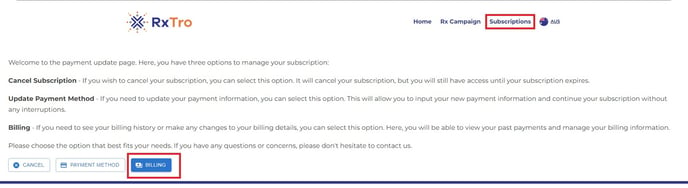
4. Scroll down to the heading: Invoice History

5. Click on the relevant invoice date to download the receipt/ invoice.
![RxTro_Training Academy_Logo_FINAL_Transp.png]](https://kb.rxtro.com/hs-fs/hubfs/RxTro_Training%20Academy_Logo_FINAL_Transp.png?height=40&name=RxTro_Training%20Academy_Logo_FINAL_Transp.png)
To view your invoice history in RxTro:
4. Scroll down to the heading: Invoice History
5. Click on the relevant invoice date to download the receipt/ invoice.