---
title: How do I remove a day from my practice schedule?
description: This article explains how to remove one or all days for that had previously been made available from a practice schedule permanently.
---
[Skip to content](https://kb.rxtro.com/migration/en/knowledge/how-do-i-remove-a-day-from-my-practice-schedule#main-content)
English
Show submenu for translations
![RxTro\_Training Academy\_Logo\_FINAL\_Transp.png\]](https://kb.rxtro.com/hs-fs/hubfs/RxTro_Training%20Academy_Logo_FINAL_Transp.png?height=40&name=RxTro_Training%20Academy_Logo_FINAL_Transp.png)
- [Default HubSpot Blog](https://blog.rxtro.com/blog)
Open main navigation
Close main navigation
- [Default HubSpot Blog](https://blog.rxtro.com/blog)
- English
Show submenu for translations
How can we help you?
- There are no suggestions because the search field is empty.
1. [Training Academy](https://kb.rxtro.com/migration/en/knowledge?hsLang=en)
2. [Clinic Support](https://kb.rxtro.com/migration/en/knowledge/clinic-support?hsLang=en)
3. [Controlling Appointment Availability](https://kb.rxtro.com/migration/en/knowledge/clinic-support?hsLang=en#controlling-appointment-availability)
# How do I remove a day from my practice schedule?
## This article explains how to remove one or all days for that had previously been made available from a practice schedule permanently.
Please Note: If you wish to only temporarily stop reps form booking appointments with your practice, please refer to this article, '[How do I 'block out/make unavailable' a range of dates from my calendar?](https://kb.rxtro.com/knowledge/how-do-i-block-out-a-range-of-dates-from-my-calendar?hsLang=en)'
- Log-In to RxTro
- You have the option to either
- [Remove the day immediately](https://kb.rxtro.com/migration/en/knowledge/how-do-i-remove-a-day-from-my-practice-schedule#RemoveTime)
- [Set an end date on an appointment](https://kb.rxtro.com/migration/en/knowledge/how-do-i-remove-a-day-from-my-practice-schedule#EndDate)
### To Set an End Date on an appointment
- Ensure that no appointments are booked beyond the date that you wish to end the appointment time.
- If there are appointments booked, you will first need to cancel these.
- Click **Clinic Appointment Times**
- Click **Set** in the **End** column
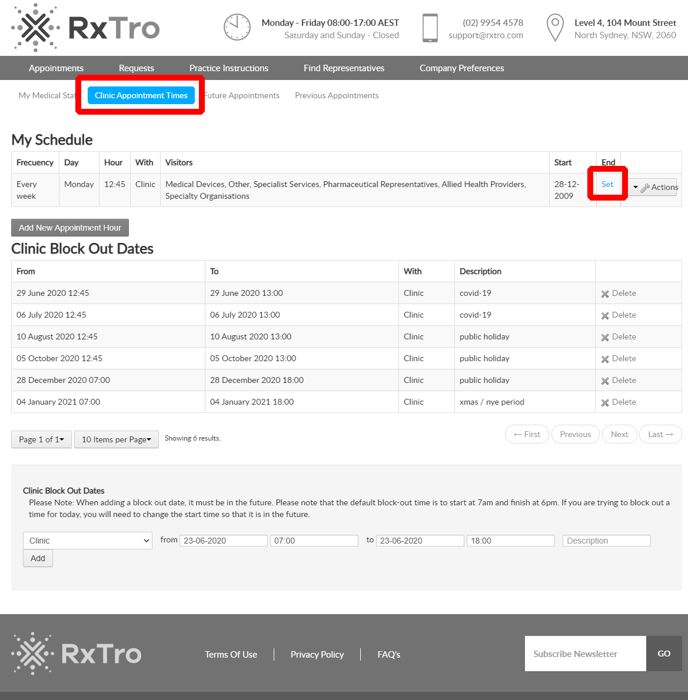
- Chose an **End Date** by selecting the date from the calendar
- Click **Save**
### To Remove the available appointment time immediately
- To remove the available appointment time immediately, you will first need to cancel appointments that are currently booked at the time that you wish to make unavailable.
- To do this, click **Actions** **\> Cancel Appointment** next to the the appointment that you wish to cancel.
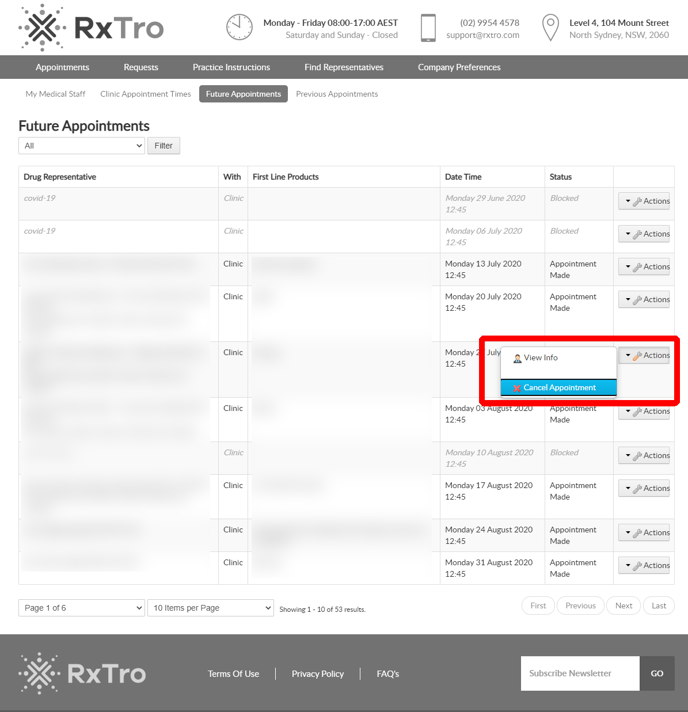
*An email will be sent to the representative telling them why the appointment has been cancelled and asking them to re-book for another date that suits.*
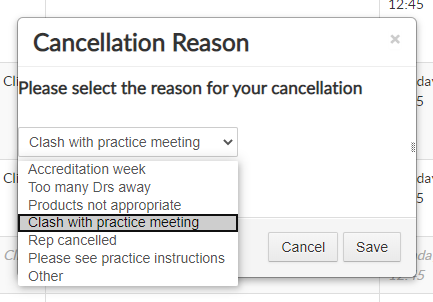
- Select a reason from our pre-populated list of reasons or choose **Other** to write your own. What ever you write in this box, is included in the email that is sent to representatives.
- - You will see that the appointment has been successfully cancelled when the status column is **Vacant**.
- Click **Clinic Appointment Times**
- Click **Actions** and **Delete Appointment Time**
**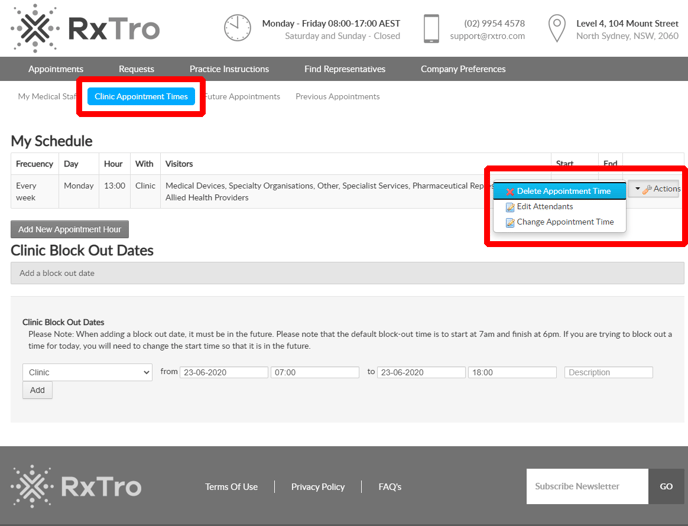**
- You will see that the appointment time disappears from the **My Schedule** section and is no longer visible on the **Future Appointments** tab.
- [15 Minute Quick Start Guides](https://kb.rxtro.com/migration/en/knowledge/15-minute-quick-start-guides?hsLang=en)
- [Clinic Support](https://kb.rxtro.com/migration/en/knowledge/clinic-support?hsLang=en#main-content)
- [Creating Medical Staff and Attendees](https://kb.rxtro.com/migration/en/knowledge/clinic-support?hsLang=en#creating-medical-staff-and-attendees)
- [Controlling Appointment Availability](https://kb.rxtro.com/migration/en/knowledge/clinic-support?hsLang=en#controlling-appointment-availability)
- [Integrating with your Practice Management Software](https://kb.rxtro.com/migration/en/knowledge/clinic-support?hsLang=en#integrating-with-your-practice-management-software)
- [Requesting Starter-Packs and patient support materials](https://kb.rxtro.com/migration/en/knowledge/clinic-support?hsLang=en#requesting-starter-packs-and-patient-support-materials)
- [Representative Support](https://kb.rxtro.com/migration/en/knowledge/representative-support?hsLang=en#main-content)
- [Creating an account](https://kb.rxtro.com/migration/en/knowledge/representative-support?hsLang=en#creating-an-account)
- [Territory Set-Up and Maintenance](https://kb.rxtro.com/migration/en/knowledge/representative-support?hsLang=en#territory-set-up-and-maintenance)
- [Territory Planning and Appointments](https://kb.rxtro.com/migration/en/knowledge/representative-support?hsLang=en#territory-planning-and-appointments)
- [Actioning Requests from Customers](https://kb.rxtro.com/migration/en/knowledge/representative-support?hsLang=en#actioning-requests-from-customers)
- [Transferring Appointments to a Colleague](https://kb.rxtro.com/migration/en/knowledge/representative-support?hsLang=en#transferring-appointments-to-a-colleague)
- [Maintaining and Updating your Profile](https://kb.rxtro.com/migration/en/knowledge/representative-support?hsLang=en#maintaining-and-updating-your-profile)
- [Master File Update Details](https://kb.rxtro.com/migration/en/knowledge/representative-support?hsLang=en#master-file-update-details)
- [Manage Products- creating products page](https://kb.rxtro.com/migration/en/knowledge/representative-support?hsLang=en#manage-products-creating-products-page)
- [Learning hub](https://kb.rxtro.com/migration/en/knowledge/learning-hub?hsLang=en#main-content)
- [CPD](https://kb.rxtro.com/migration/en/knowledge/learning-hub?hsLang=en#cpd)
- [Products & services](https://kb.rxtro.com/migration/en/knowledge/learning-hub?hsLang=en#products-services)
- [Default HubSpot Blog](https://blog.rxtro.com/blog)
[](http://www.rxtro.com)
Copyright © 2026, RxTro
```json
{
"@context" : "https://schema.org",
"@type" : "VideoObject",
"contentUrl" : "https://6991016.fs1.hubspotusercontent-na1.net/hubfs/6991016/RxTro-%20Clinic-%20Remove%20appt%20Time%20from%20Schedule%20pt1.mp4",
"dateModified" : "2022-05-05T06:25:04.480Z",
"duration" : "PT2M8.267S",
"height" : 1040,
"name" : "RxTro- Clinic- Remove appt Time from Schedule pt1",
"thumbnailUrl" : "https://6991016.fs1.hubspotusercontent-na1.net/hubfs/6991016/RxTro-%20Clinic-%20Remove%20appt%20Time%20from%20Schedule%20pt1.mp4/medium.jpg",
"uploadDate" : "2022-05-05T06:24:55.667Z",
"width" : 1920
}
```
```json
{
"@context" : "https://schema.org",
"@type" : "VideoObject",
"contentUrl" : "https://6991016.fs1.hubspotusercontent-na1.net/hubfs/6991016/limit%20how%20far%20in%20Advance%20the%20Appointment%20is%20available.mp4",
"dateModified" : "2022-05-06T01:24:23.465Z",
"duration" : "PT3M51S",
"height" : 1040,
"name" : "limit how far in Advance the Appointment is available",
"thumbnailUrl" : "https://6991016.fs1.hubspotusercontent-na1.net/hubfs/6991016/limit%20how%20far%20in%20Advance%20the%20Appointment%20is%20available.mp4/medium.jpg",
"uploadDate" : "2022-05-06T01:24:10.919Z",
"width" : 1920
}
```